An AI workspace for teams, each person in their own lane

Give your team one shared space — plans, files, data, sales — and one pool of AI credits. Choose what each person can open, set a limit per person, and see every change.
Start on the free plan — no card needed.
- 🏢 A shared team space
- 🎚️ Roles and areas
- 💳 One pool of credits
- 📜 An activity log
Work together without stepping on each other
Everyone keeps their own account and switches into the team space when they work for the team.
A shared space
The team’s subjects, plans, files, data, Sales and Recruiting, in one place everyone works in.
Roles
Owner, admins, members and viewers — viewers read, members work, admins manage.
Areas
Choose what each person can open: planning, files, data, sales, recruiting, SEO and more.
Shared credits
One pool for the whole team, with an optional monthly limit for each person.
Invitations
Invite by e-mail address; an invitation waits in the app until it is answered.
Activity log
Who joined, who changed what and when — every change written down.
Give each person the access they need
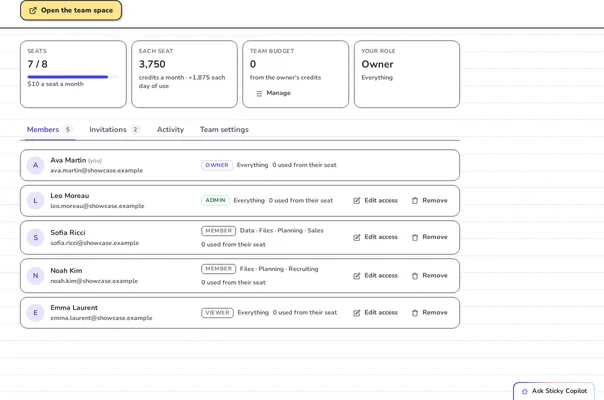
Add people with a role, then pick the areas they can open — a member who only does planning and files never sees Sales. Change it at any time; a person you remove is out at once.
- The AI follows the same areas as the person
- A monthly credit limit per person, if you want one
- Hand the team to someone else, or leave it
See every change in the team
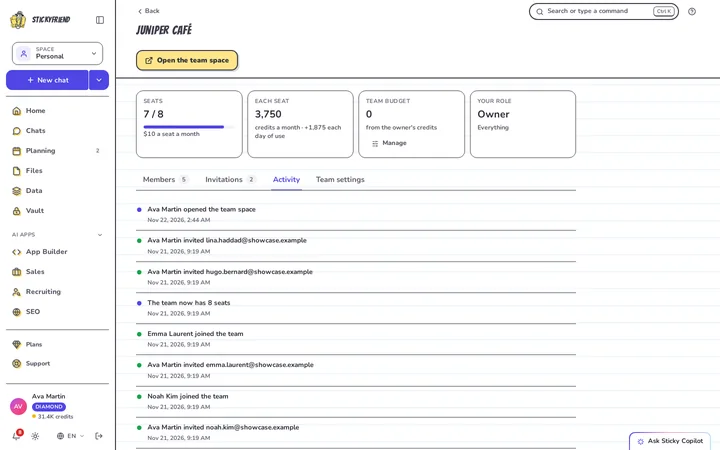
Invitations, new members, seats, role changes and the work done in the space are written to the team’s activity log, with who did it and when. The credits each person uses are counted too.
- Who did what, and when
- Credits used by each person this period
- Admins see it; members do their work
- Comments with @mentions on dashboards, and each change with its author
Shared work, private conversations
A team space shares the work, not the person.
Your chats are yours
Chats in the team space are private to their author until they choose to share one — read-only for the others.
What the AI remembers is yours
The AI’s memory of you stays with you, not with the team.
Your vault stays personal
The team space never opens your vault, your billing or your keys.
Your own account, untouched
Switch back to your account in one click: your personal subjects never mix with the team’s.
Set up your team in three steps
Teams come with the Enterprise plan.
Ask for Enterprise
Tell us your team and how many seats you need, from the Plans page.
Create the team
Name it, invite people by e-mail and choose their roles and areas.
Work together
Everyone switches into the team space and works with the AI there.
The owner stays in control
Simple rules that protect the team and each person in it.
- Every seat is used by a member or a pending invitation — you always know who is in.
- Removing someone shuts them out of the space immediately.
- Deleting a team needs its name typed, so it never happens by accident.
- Billing, passwords and keys are never reachable from the team space.
Team workspace questions, answered
Which plan includes teams?
Teams come with the Enterprise plan. Ask for it from the Plans page with the number of seats you need, and we answer by e-mail.
What does each seat include?
Each seat adds the credits of our top plan to the team’s shared pool, and the team space has the top plan’s features and limits.
Can I limit what a person sees?
Yes. Pick a role — admin, member or viewer — and the areas each person can open; the AI follows the same limits.
Can I limit how many credits a person uses?
Yes. Set a monthly credit limit per person; the credits each one uses are counted for admins.
Can the team read my chats?
No. Chats are private to their author until shared, and a shared chat is read-only for the others.
Do team members need their own account?
Yes, each person signs in with their own account and switches into the team space. An invitation to a new address waits until that person signs up.
Can someone belong to several teams?
Yes. A person can be invited to more than one team and switch between them and their own account.
Can we discuss a dashboard together?
Yes. Comment on a dashboard or on one chart and mention a teammate: they are told in their notifications. Each dashboard and each table also shows who changed what — a teammate’s change carries their name.
Can StickyFriend run in our own network?
Yes — ask about the On-premise plan: StickyFriend in your private network or a managed cloud, with local or cloud models.
Everything else StickyFriend does
The core features and the AI apps share your subjects, your people, your calendar and your files — one account, one place.
Core features
AI chat
Ask in plain words: it makes the notes, to-dos, events and documents for you.
Planning
To-dos, a board, a calendar and a timeline for every subject — or all at once.
Documents & notes
Word, Excel, PowerPoint and PDF made and edited for you, notes, and knowledge bases.
Data & dashboards
Tables of your records, dashboards, forms and trackers — built by asking.
Connected apps
Gmail, Slack, Notion, GitHub and 55 more — the AI acts there after your yes.
Vault
Passwords, cards and API keys behind your PIN — the AI uses a key, never sees it.
AI Apps
Sales — AI CRM
Find leads and work emails, follow every deal and let the AI draft your follow-ups.
Recruiting
Drop the CVs, get explained match scores, run interviews — and decide yourself.
SEO
Track your Google rankings, audit your site and plan what to write next.
App Builder
Describe a mini app: the AI writes the files and runs it in your browser.
Bring your team into one AI workspace
Start free on your own account, then ask for Enterprise when your team is ready.