The AI planner for everything with a date

To-dos, appointments and roadmap phases from every subject in one plan — as a list, a board, a calendar or a timeline. Ask the AI to plan your week, and move things with a drag.
Start on the free plan — no card needed.
- ✅ To-dos and a board
- 📅 Calendar and reminders
- 📈 Gantt timeline and roadmaps
- 🔄 Google Calendar sync
Your whole plan, in the view you need
One plan for every subject — your work, your projects, your life — and four ways to look at it.
List
Every open task across your subjects in one place, grouped by subject, with tags and dates.
Board
Drag work between To do, Doing and Done. Filter by subject or tag, however many you have.
Calendar
Tasks, roadmap items, appointments and dated notes, merged in one month.
Timeline
A Gantt chart by week or month, with a tray for what has no date yet.
Roadmaps
Phases with start, end and progress for each subject — see what slips before it does.
Reminders
A nudge before each appointment, on your phone too, and a morning briefing of your day.
Plan your day or your week by asking
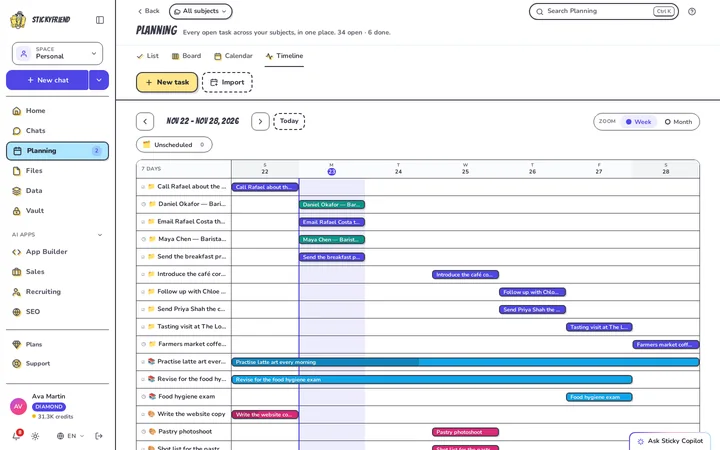
“Plan my week.” “Move the tasting to Thursday and remind me an hour before.” The AI reads your calendar and your to-dos first, proposes an order, and makes the changes when you say yes — no double bookings, nothing forgotten.
- Adds many to-dos at once, with dates and tags
- Sets reminders the way you say them
- Turns a goal into roadmap phases for a subject
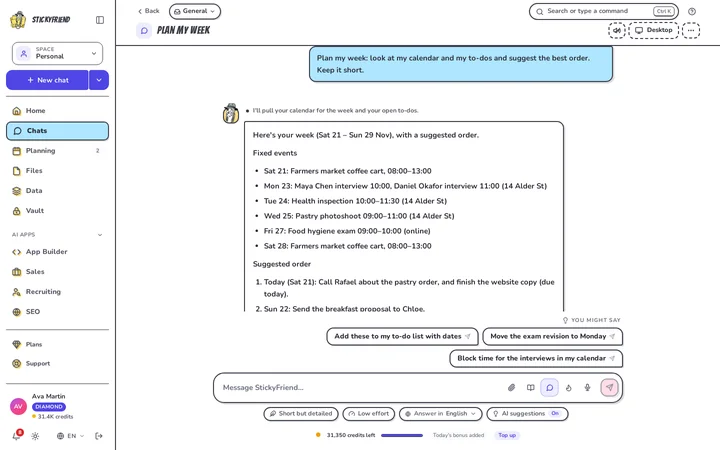
One calendar for everything with a date
Appointments, deadlines, roadmap phases and dated notes from all your subjects, merged in one month. Import your Google Calendar and it stays in sync, or bring any .ics file.
- Google Calendar kept in sync every 30 minutes
- Reminders from none to one day before, per appointment
- Quiet hours keep your evenings quiet
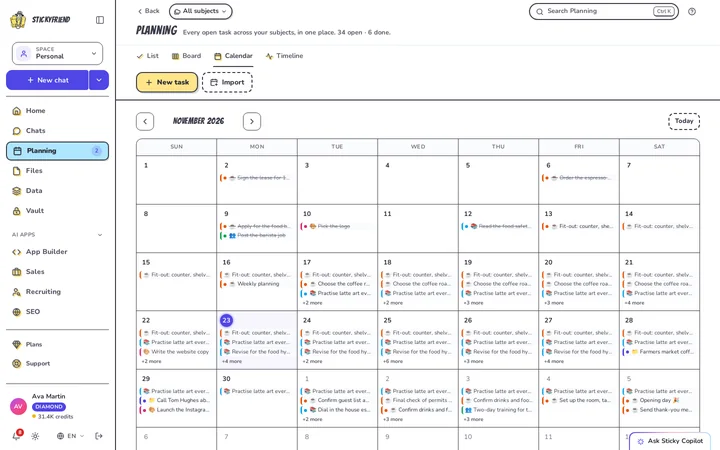
A Gantt timeline you never have to draw
Your tasks and roadmap phases laid out on a timeline, by week or by month. See what overlaps and what has no date yet, and add work straight onto the axis.
- An Unscheduled tray for work without dates
- Each subject’s roadmap, phase by phase
- CRM tasks from Sales show up here too
Get organised in three steps
Start with what is in your head; the planner and the AI do the sorting.
Write it down
Add a to-do from anywhere, or tell the AI everything you have to do.
Let the AI sort it
It sets dates, tags and subjects, and fits the work around your appointments.
Work the plan
Drag cards on the board, check them off, and get reminded at the right time.
One planner for work and life
Subjects keep each part of your life apart — and the planner shows them together.
Freelancers
Every client a subject, every deadline on one calendar.
Small teams
A board per project and a shared plan everyone can see in a team space.
Students
Exams, assignments and revision sessions, planned backwards from the date.
Busy people
The school run, the dentist and the side project, without three apps.
The AI proposes. You approve.
Your plan changes when you want it to.
- The AI reads your calendar before it schedules, so it does not double-book.
- It asks before deleting a to-do or an appointment, and names exactly which one.
- General to-dos stay general; a subject’s plan stays in its subject.
- Notifications follow your quiet hours.
AI planner questions, answered
What is an AI planner?
A planner the AI can fill and rearrange for you. In StickyFriend you can ask it to add to-dos, schedule appointments with reminders or plan your week, and see the result as a list, a board, a calendar or a timeline.
Can it sync with Google Calendar?
Yes. Pick the calendars to import and they stay in sync every 30 minutes. You can also import any .ics file.
Does it have a Kanban board and a Gantt chart?
Yes: a board with To do, Doing and Done, and a timeline by week or month with each subject’s roadmap phases.
Will I get reminders on my phone?
Yes. Install the app on your phone and turn on notifications: reminders arrive even when the app is closed, and a morning briefing tells you what today holds.
Can the AI plan my week?
Yes. It reads your appointments and open to-dos across your subjects, proposes the best order and points out what clashes. It changes things only when you say so.
Can I keep work and personal plans apart?
Yes. Each project or topic is a subject with its own to-dos and roadmap; the planner shows one subject or all of them, and general to-dos belong to no subject.
What if I have lots of subjects and tags?
The filters stay on one line on every screen: what fits is shown, the one in use is always there, and the rest opens in a list you can search.
Can my team share a plan?
Yes, in a team space on the Enterprise plan: everyone sees the team’s plan, each with the access you give them.
Is the planner free?
Yes, planning is part of the free plan. Paid plans add more credits for the AI and more; the plans are on the pricing page.
Everything else StickyFriend does
The core features and the AI apps share your subjects, your people, your calendar and your files — one account, one place.
Core features
AI chat
Ask in plain words: it makes the notes, to-dos, events and documents for you.
Documents & notes
Word, Excel, PowerPoint and PDF made and edited for you, notes, and knowledge bases.
Data & dashboards
Tables of your records, dashboards, forms and trackers — built by asking.
Connected apps
Gmail, Slack, Notion, GitHub and 55 more — the AI acts there after your yes.
Vault
Passwords, cards and API keys behind your PIN — the AI uses a key, never sees it.
Teams
One shared workspace and one pool of credits, each person in their own lane.
AI Apps
Sales — AI CRM
Find leads and work emails, follow every deal and let the AI draft your follow-ups.
Recruiting
Drop the CVs, get explained match scores, run interviews — and decide yourself.
SEO
Track your Google rankings, audit your site and plan what to write next.
App Builder
Describe a mini app: the AI writes the files and runs it in your browser.
Your week, planned before your coffee
Start free, write down what you have to do and let the AI put it in order.