AI recruiting software that reads every CV — and leaves the call to you

Post a job, drop the CVs: the AI reads each one, scores it against your requirements and shows its reasons. Then you run the hiring — pipeline, interviews, feedback and emails — in one place.
Start on the free plan — no card needed.
- 📄 Reads PDF, Word and photos
- 🎯 Explained match scores
- 🗓️ Interviews in your calendar
- ✉️ Emails wait for your OK
Everything you need to hire, without an enterprise ATS
Jobs, CVs, candidates and interviews in one app, with an AI that does the reading and leaves the decisions to you.
Write the job ad
Give a title and a few words: the AI writes the ad and proposes what to score candidates on. Or paste an ad you already have.
Drop the CVs
Up to 200 at once. Each becomes a candidate; anything the AI is unsure of waits for you.
Explained match scores
Every requirement checked against the CV — met, partly or missing — with the line it found.
A pipeline per job
From sourced to hired, on a board or in a table ranked by score.
Interviews and scorecards
Schedule into your calendar and rate everyone on the same criteria.
Emails you approve
Templates fill themselves in from the candidate, the job and the interview. Nothing goes out until you accept it.
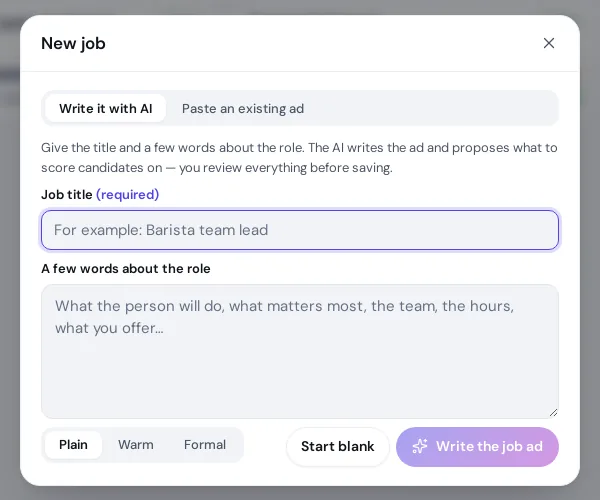
Write a job ad with AI in a minute
Give the title and a few words about the role. The AI writes the ad in a plain, warm or formal tone and proposes the requirements to score candidates on — must-haves and nice-to-haves, with a level or a number of years. You review everything before it is saved. Already have an ad? Paste it and the AI fills in the job.
- Flags wording that could put good candidates off
- Pay range, work mode, contract and seniority on every job
- An optional public application page, with one link per channel
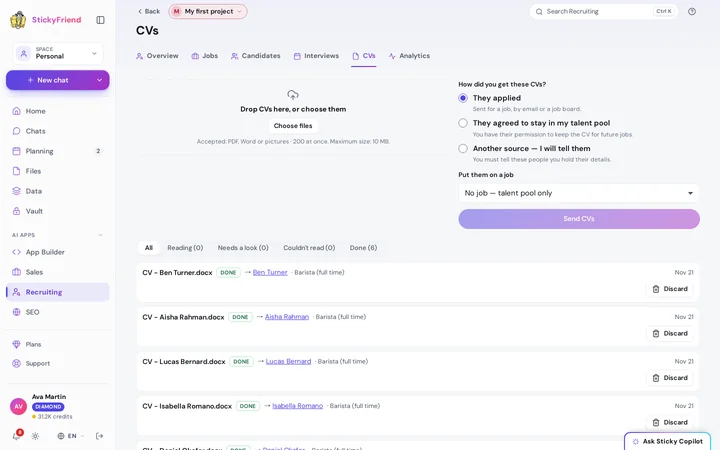
A CV parser that reads what you drop — even photos
Drop a pile of CVs, or let people apply through the job’s application page. The AI reads each one into a candidate — contact, experience, skills, languages, education — and flags what it is not sure about instead of guessing. A CV from someone you already have is matched to that person.
- PDF, Word, RTF, ODT, text, JPG or PNG — up to 200 at once
- Hidden white or tiny text is detected and ignored
- Say how you got the CVs, so consent is on record
- Put people straight on a job, or keep them in your talent pool
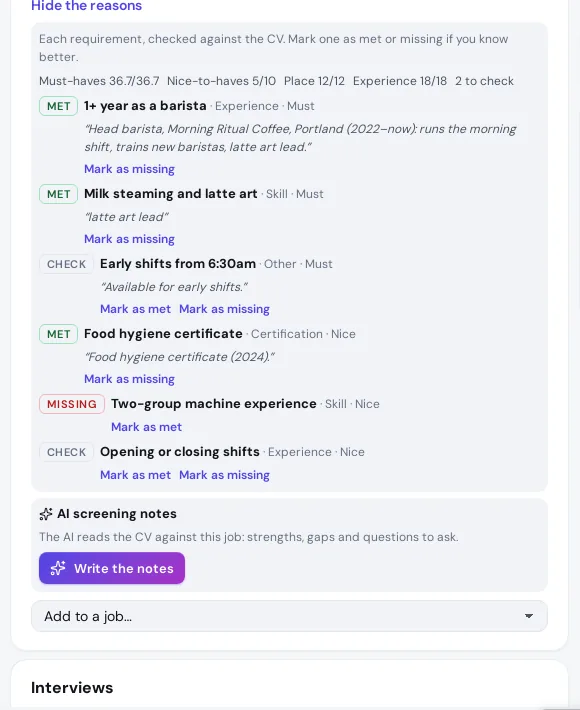
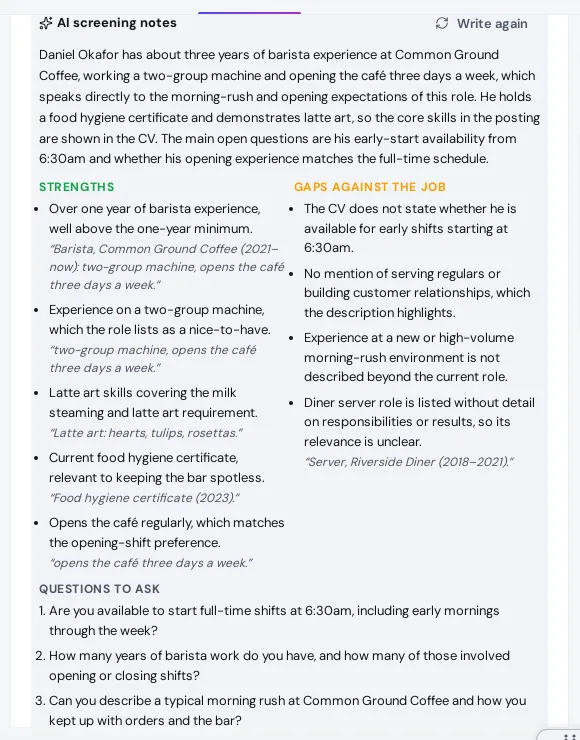
AI CV screening that shows its work
Every candidate gets a score for each job, built from that job’s requirements. Must-haves weigh the most — a missing one caps the score — and each requirement shows what the AI found in the CV, quoted. Ask for screening notes and the AI lists strengths, gaps and the questions to ask. If you know better, mark a requirement met or missing yourself.
- Bands from strong to low match, best first
- Missing must-haves shown on every candidate
- Scores are advice — the decision is always yours
Rank candidates automatically, then read the ones that matter
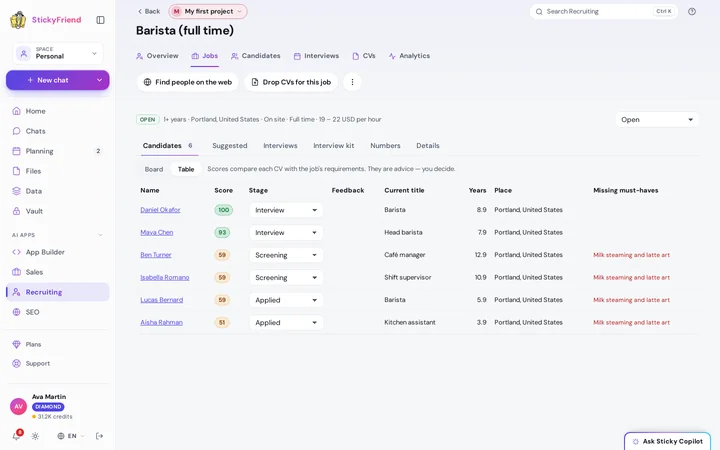
Switch a job to the table to see everyone ranked by match score, with their current title, years of experience, place and missing must-haves. Move several people at once, reject with a reason, and let the AI suggest people from your talent pool who fit but have not applied.
- Search the whole pool by skills, title, city or years
- Rejecting someone never tells them — you choose what to send
- Hiring analytics: funnel, time to hire, sources and rejection reasons
Interview kits and scorecards that keep hiring fair
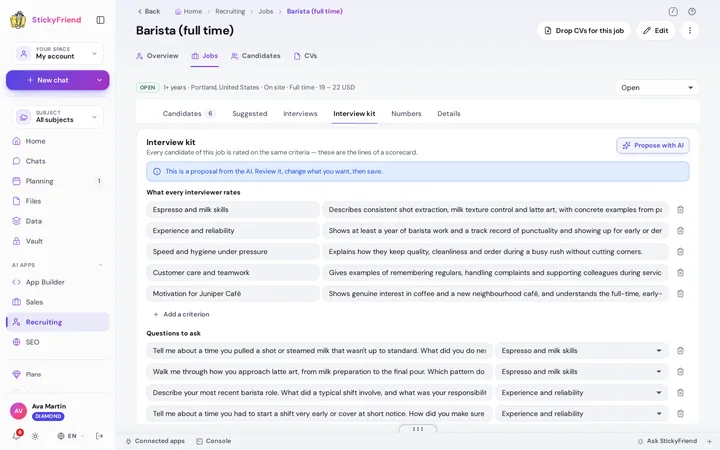
Every candidate for a job is rated on the same criteria. Ask the AI to propose them from the job’s must-haves, with what a strong answer shows and the questions to ask — then edit and save. Interviews go into your calendar, and each interviewer leaves a scorecard from 1 to 4 with a recommendation.
- Phone, video or on site, with the address or the link
- The candidate is not invited behind your back: you send the invitation
- Every interviewer’s feedback in one place, with the overall leaning
GDPR-friendly recruiting, built in
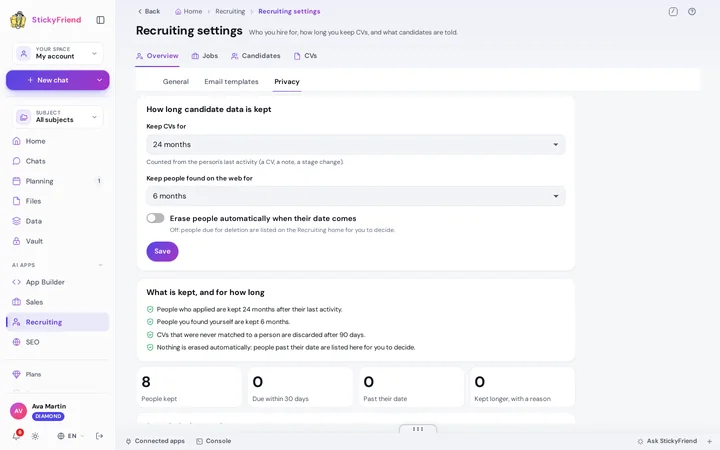
Choose how long CVs are kept, counted from each person’s last activity, and whether people past their date are erased automatically or listed for you to decide. A ready-made candidate notice tells applicants how their data is used, and anyone can be exported or erased in one go.
- Separate periods for applicants and for people you found yourself
- CVs never matched to a person are discarded automatically
- A reminder when people still need to be told you hold their details
Source candidates from LinkedIn with the extension
Add StickyFriend to Chrome and recruit where candidates already are. See the browser extension.
Save a profile in one click
On a LinkedIn profile or a search, add people to your talent pool — their experience, education, skills and languages filled in.
Straight onto a job
Put them on a job at the stage you choose — or first see how a page of profiles fits the job, without saving anyone.
Keep hiring from any tab
Ask the side chat who is waiting, move a candidate, add a note or book an interview — the same Recruiting as the web app.
Drop a CV in the chat
Attach CVs to the side chat: they go to your CV inbox, read and matched with the people you already have.
Connect the tools recruiters already use
Connect your accounts once: the AI works in them, and asks before it sends, posts or moves anything. See every connector.
Gmail and Outlook
Write to candidates from your own mailbox: the AI drafts the invitation or the answer, and it goes out when you say yes.
Google Calendar
The AI finds a free slot and adds the interview to your calendar, which also shows in your planner.
Trello, Asana and monday.com
Keep a hiring board where your team already works — a card per candidate, moved as they progress. Just ask.
LinkedIn
Post your job ad on your profile or company page: the AI writes it, you publish it with one click.
HubSpot and Salesforce
For agencies: look up and update your client companies and contacts in the CRM you already use.
Slack and Microsoft Teams
Share a shortlist with the hiring manager in your usual channel, once you approve the message.
From job ad to hire, in four steps
No set-up and no training: create a job and drop the CVs you already have.
Create the job
Write it with AI, paste an existing ad or start blank.
Drop the CVs
Or open the application page and let people apply with theirs.
Read the shortlist
Scores, reasons and screening notes, best match first.
Interview and decide
Kits, scorecards and emails you approve — then you choose.
An applicant tracking system for small businesses
For anyone who hires now and then and wants a clear shortlist, not another big system.
Small businesses
A café hiring baristas, a shop hiring for the season: one job, a pile of CVs, a clear shortlist.
Recruitment agencies
Hire for clients as well as your own team, with a talent pool that grows with every CV.
Startups
Structured interviews from the very first hire, without a heavy set-up.
Hiring managers
Read fewer CVs, and better ones, with every decision still in your hands.
Scores are advice. People decide.
The AI reads and explains; it never hires, rejects or contacts anyone by itself.
- The AI refuses to rank or filter people on age, gender, origin, religion, health, family, looks or a photo.
- Moving, rejecting or scheduling never tells the candidate: you choose what to send.
- Every email waits for your approval before it goes out.
- Hidden text stuffed into a CV is ignored, so nobody games the score.
Connected to the rest of your work
Recruiting is one app inside StickyFriend, so your hiring meets your calendar, your contacts and your forms.
Planning
Interviews land in your calendar with the place or the video link.
Sales
Candidates are people in the same records: open any of them in Sales.
Forms
A form can collect CVs and send them straight to the CV inbox.
Gmail and Outlook
On paid plans, the emails you approve go out from your own mailbox.
AI recruiting questions, answered
What is AI recruiting software?
Software that runs your hiring — jobs, applications, interviews — with an AI that does the reading. In StickyFriend, the AI reads every CV, scores it against the job’s requirements, explains the score and drafts notes and emails. People make every decision.
How does AI CV screening work?
Each CV is read into a candidate profile. For every job, each requirement is checked against it and marked met, partly or missing, with the line from the CV. Must-haves weigh the most, and a missing must-have caps the score.
Will the AI reject candidates on its own?
No. It never moves, rejects or contacts anyone by itself. Scores are advice, and moving or rejecting someone never notifies them unless you send an email.
Is the scoring fair?
Scores come only from the requirements you set for the job. The AI refuses to judge or rank people on age, gender, origin, religion, health, family, looks or a photo, and you can correct any requirement it marked wrongly.
Which CV formats can it read?
PDF, Word (DOC and DOCX), RTF, ODT, plain text, and photos of a CV in JPG or PNG — up to 200 files at once, 10 MB each.
Can candidates apply online?
Yes. Turn on a job’s application page and share its link: people apply with their CV and land in your CV inbox. Copy one link per channel to see where applications come from.
Does it email candidates?
Only when you say so. Templates for a received application, an interview, an offer or a rejection fill themselves in. On paid plans the email goes out from your connected Gmail or Outlook once you accept it; otherwise you copy it or open it in your mail app.
Is it GDPR-friendly?
You set how long CVs are kept, choose whether people past their date are erased automatically, get a ready-made candidate notice, and can export or erase everything about a person in one step.
Is it an applicant tracking system for small businesses?
Yes: jobs, a pipeline per job, a talent pool, interviews, scorecards, email templates and hiring analytics, with no set-up or training. It is part of the StickyFriend workspace.
Can I start for free?
Yes, on the free plan with no card. How many candidates and CVs you can keep depends on your plan; the plans are on the pricing page.
Everything else StickyFriend does
The core features and the AI apps share your subjects, your people, your calendar and your files — one account, one place.
Core features
AI chat
Ask in plain words: it makes the notes, to-dos, events and documents for you.
Planning
To-dos, a board, a calendar and a timeline for every subject — or all at once.
Documents & notes
Word, Excel, PowerPoint and PDF made and edited for you, notes, and knowledge bases.
Data & dashboards
Tables of your records, dashboards, forms and trackers — built by asking.
Connected apps
Gmail, Slack, Notion, GitHub and 55 more — the AI acts there after your yes.
Vault
Passwords, cards and API keys behind your PIN — the AI uses a key, never sees it.
Teams
One shared workspace and one pool of credits, each person in their own lane.
AI Apps
Sales — AI CRM
Find leads and work emails, follow every deal and let the AI draft your follow-ups.
SEO
Track your Google rankings, audit your site and plan what to write next.
App Builder
Describe a mini app: the AI writes the files and runs it in your browser.
Read fewer CVs. Hire better.
Start free, drop your first CVs and see the shortlist the AI explains.