AI integrations with the apps you already use

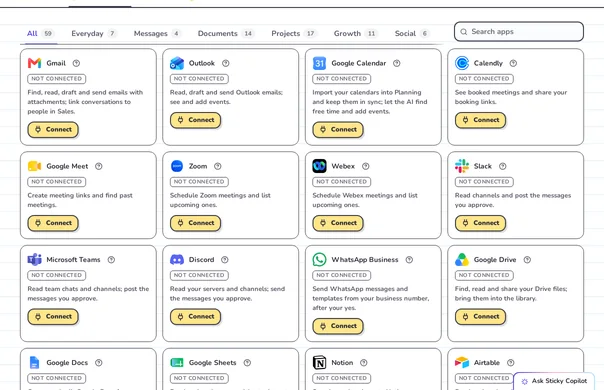
Connect Gmail, your calendar, Slack, Notion, GitHub and 54 more. The AI reads, searches and drafts in them for you — and anything that sends, posts or deletes waits for your click.
Start on the free plan — no card needed.
- 📧 Gmail and Outlook
- 📅 Calendars and meetings
- 💬 Slack, Teams, Discord
- 🗂️ Notion, Drive, GitHub
One place to work across all your apps
Instead of copying between tabs, ask: the AI works where your information already lives. See all 59 connectors.
E-mail
Find a thread, summarise it, draft the answer — you read it and press send.
Calendars
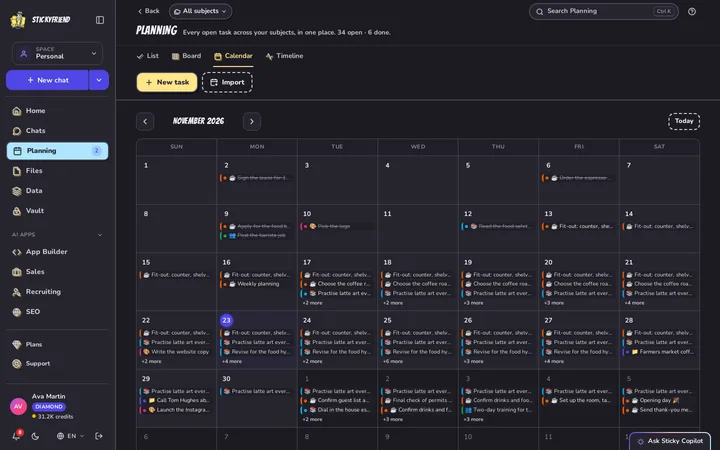
Google Calendar comes into your planner and stays in sync; meetings in Zoom, Meet or Webex.
Messages
Slack, Microsoft Teams, Discord and WhatsApp Business, read and drafted for you.
Documents
Notion, Google Drive, Docs and Sheets, Dropbox, OneDrive, SharePoint, Confluence and more.
Projects
Trello, Asana, ClickUp, monday.com, Linear, Jira, GitHub, GitLab, Figma and more.
Growth and social
Search Console, Analytics, Ads, Mailchimp, HubSpot, Salesforce, LinkedIn, Instagram, YouTube and more.
You decide what the AI may do in each app
Every app card says what the AI can do there, split into what it may do on its own — read, search, draft — and what it must ask first: send, post, move or delete. Switch the AI off for an app at any time.
- A card under the reply for every action that needs you
- Nothing is sent on its own, ever
- Disconnect an app in one click
Your apps feed your planner, files and data
Connected apps do not stay in their own corner: your Google Calendar shows up in Planning, Drive files go into a knowledge base, a Sheets tab becomes a table that stays in sync, and Gmail conversations attach to the right person in Sales.
- Attachments saved to your Files, in Downloads
- Send or draft e-mails with your own files attached
- Push App Builder projects to GitHub, GitLab or Bitbucket
Bring any e-mail account, not just Gmail
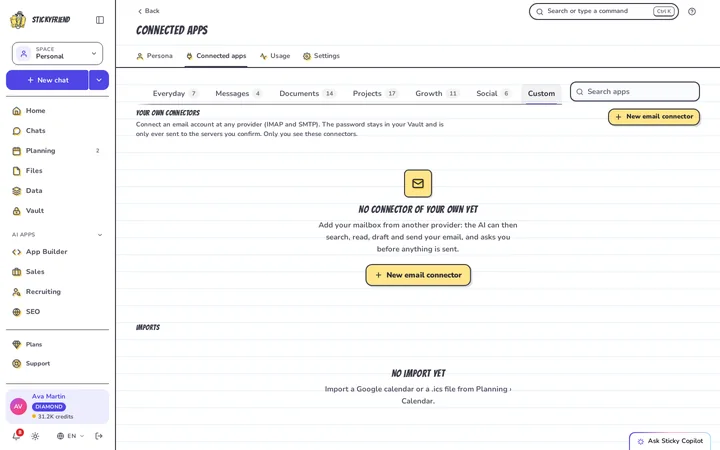
Connect an address at any provider through IMAP and SMTP: the servers are found from your address and you confirm them. The password is kept in your Vault and goes only to the servers you confirmed.
- Reading and drafting can run on their own; sending always asks
- Only you can see your mailbox
- Up to 3, 10 or 25 mailboxes on Silver, Gold and Diamond
Integrations beyond the catalogue
For the tools that are not on the list yet.
Webhooks
Signed events from your CRM to Zapier, Make or any address, and a webhook that creates contacts.
The browser extension
In Chrome, the AI works on the page you are on: LinkedIn prospecting, forms, tabs, bookmarks and highlights.
Your own SEO keys
Semrush, SerpApi and DataForSEO with your own account, for the SEO app.
API keys in the Vault
Keep a key the AI may use for a task you ask for — without ever seeing it.
Connect an app in three steps
A secure sign-in, your rules, then just ask.
Connect
Pick the app and sign in to it through its own secure page.
Set the rules
Choose what the AI may do on its own and what it must ask.
Ask
“Summarise today’s e-mails from suppliers and draft the replies.”
Connected, never out of control
The promises the product keeps for every app.
- Sending, posting, moving and deleting always wait for your click.
- Apps in the catalogue sign in on their own page, so StickyFriend never sees those passwords.
- Custom mailbox passwords stay in your Vault, for the servers you confirmed only.
- Switch the AI off for an app, or disconnect it, whenever you like.
AI integration questions, answered
Which apps can I connect?
Fifty-nine, including Gmail, Outlook, Google Calendar, Zoom, Slack, Microsoft Teams, Notion, Google Drive, Dropbox, Trello, Asana, Jira, GitHub, HubSpot, Salesforce, LinkedIn, Instagram and YouTube.
Will the AI send e-mails or posts without asking?
No. Anything that sends, posts, moves or deletes shows a card under the reply and waits for your click.
Can I connect an e-mail account that is not Gmail?
Yes. Outlook is in the catalogue, and any other provider connects through IMAP and SMTP as a custom mailbox.
Does Google Calendar sync both ways?
Your Google calendars come into Planning and stay in sync every 30 minutes. With Google Calendar connected, the AI can also work in it, within the permissions you set.
Can the AI work with attachments?
Yes. It can save an attachment to your Files and attach your own files to an e-mail it drafts or sends for you.
Is there a Zapier or Make integration?
Yes, through webhooks: your CRM sends signed events to Zapier, Make or any address, and an incoming webhook creates contacts.
Are connected apps free?
Connected apps are part of the paid plans — Silver, Gold and Diamond. The plans are on the pricing page.
How are my accounts kept safe?
Apps in the catalogue sign in on their own page, a custom mailbox keeps its password in your Vault, you choose the AI’s permissions app by app, and you can disconnect at any time.
What can the browser extension do that the web app cannot?
It works on the page you are on: prospecting on LinkedIn, Sales Navigator and Recruiter, filling forms, and your tabs, bookmarks and highlights.
Everything else StickyFriend does
The core features and the AI apps share your subjects, your people, your calendar and your files — one account, one place.
Core features
AI chat
Ask in plain words: it makes the notes, to-dos, events and documents for you.
Planning
To-dos, a board, a calendar and a timeline for every subject — or all at once.
Documents & notes
Word, Excel, PowerPoint and PDF made and edited for you, notes, and knowledge bases.
Data & dashboards
Tables of your records, dashboards, forms and trackers — built by asking.
Vault
Passwords, cards and API keys behind your PIN — the AI uses a key, never sees it.
Teams
One shared workspace and one pool of credits, each person in their own lane.
AI Apps
Sales — AI CRM
Find leads and work emails, follow every deal and let the AI draft your follow-ups.
Recruiting
Drop the CVs, get explained match scores, run interviews — and decide yourself.
SEO
Track your Google rankings, audit your site and plan what to write next.
App Builder
Describe a mini app: the AI writes the files and runs it in your browser.
Put your apps to work together
Start free today; connect your apps when you move to a paid plan.