A secure vault your AI can use without seeing

Keep logins, cards, signatures and API keys encrypted behind your own PIN. When a task needs a key, the AI asks to use it — and the value never reaches it.
Start on the free plan — no card needed.
- 🔑 Logins and passwords
- 💳 Cards
- ✍️ Signatures and stamps
- 🧩 API keys and key files
Your secrets, out of your notes
Passwords stop living in a note called “passwords”. Everything sensitive gets one safe place.
Logins
Sites, user names and passwords, revealed one field at a time.
Cards
Card details kept encrypted, never shown in full until you ask.
Signatures and stamps
Your signature and your company stamp, kept in one safe place.
API keys and key files
The keys of the services you use, and the files that unlock them.
Secure notes
Recovery codes, door codes and anything else you would rather not leave in a note.
Activity log
Every reveal and every use by the AI, written down for you to check.
The AI uses your key. It never sees it.
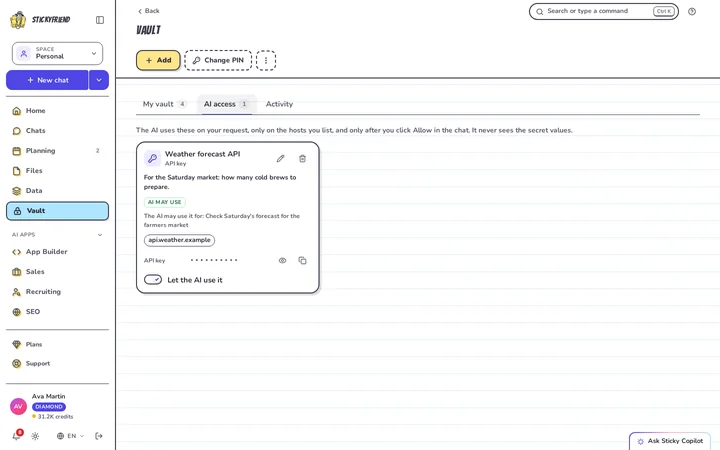
Put an API key in AI access and say which addresses it may be sent to. When a chat needs it, the AI asks to use it, you allow it with a click, and the key goes straight to that service — the AI only sees the answer.
- Each key lists the hosts it may call
- Allowed chat by chat, with one click
- Every use is in the activity log
Locked behind a PIN only you know
Choose a PIN of 4, 6 or 8 digits. The vault locks itself when you stop using it, refuses trivial PINs, and locks for longer each time wrong PINs are tried.
- Locks after 15 minutes idle, 60 minutes at most
- Values shown one field at a time
- Forgot the PIN? Reset it by e-mail
Safe in three steps
Set it up once; it guards your secrets from then on.
Choose a PIN
Four, six or eight digits — your choice.
Add your secrets
Logins, cards, signatures, notes and keys, each in its own kind of card.
Let the AI use a key
Move an API key to AI access and choose where it may be sent.
Built so your secrets stay secret
The rules the vault keeps, every time.
- Everything is encrypted, and opens only with your PIN.
- The AI never reads a value — not a password, not a card, not a key.
- A team space never opens your vault: it is yours alone.
- Every reveal and every use is logged.
Vault questions, answered
What can I keep in the vault?
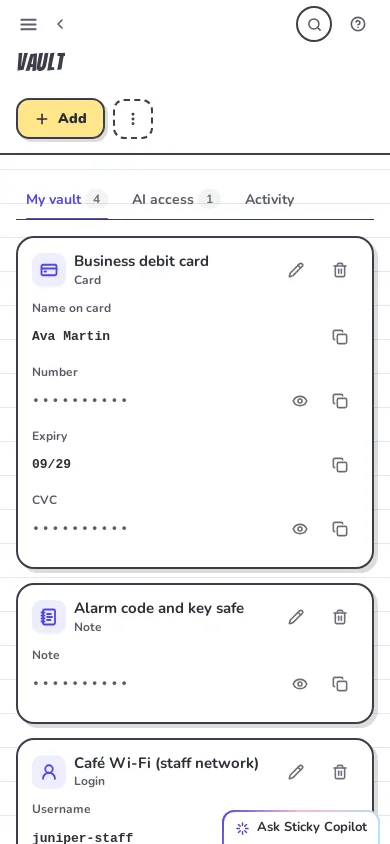
Logins, secure notes, cards, signatures, stamps, key files and API keys — up to 200 items.
How is it protected?
Your items are encrypted and open only with your PIN of 4, 6 or 8 digits. The vault locks itself after 15 minutes idle and 60 minutes at most.
Can the AI read my passwords?
No. The AI never reads a value. In AI access it can use an API key for a task you asked for, and the key goes to that service without passing through the AI.
How does AI access work?
You add a key and the addresses it may be sent to. When a chat needs it, the AI asks, you allow it with a click, and only the service’s answer comes back.
What if I forget my PIN?
You can reset it by e-mail.
What happens after wrong PIN attempts?
Repeated wrong PINs lock the vault for longer each time, so a PIN cannot be guessed by trying.
Can my team see my vault?
No. The vault is personal: a team space never shows it, and the AI cannot use its keys there.
Is the vault free?
Yes, the vault is part of every plan, the free one included.
Everything else StickyFriend does
The core features and the AI apps share your subjects, your people, your calendar and your files — one account, one place.
Core features
AI chat
Ask in plain words: it makes the notes, to-dos, events and documents for you.
Planning
To-dos, a board, a calendar and a timeline for every subject — or all at once.
Documents & notes
Word, Excel, PowerPoint and PDF made and edited for you, notes, and knowledge bases.
Data & dashboards
Tables of your records, dashboards, forms and trackers — built by asking.
Connected apps
Gmail, Slack, Notion, GitHub and 55 more — the AI acts there after your yes.
Teams
One shared workspace and one pool of credits, each person in their own lane.
AI Apps
Sales — AI CRM
Find leads and work emails, follow every deal and let the AI draft your follow-ups.
Recruiting
Drop the CVs, get explained match scores, run interviews — and decide yourself.
SEO
Track your Google rankings, audit your site and plan what to write next.
App Builder
Describe a mini app: the AI writes the files and runs it in your browser.
Give your secrets one safe home
Start free, choose your PIN, and move your passwords out of your notes today.