The AI chat assistant that does the work

Ask in plain words. The AI makes the notes, to-dos, events, documents and charts — in the right subject — and shows you what it did. You stay in charge of everything it sends.
Start on the free plan — no card needed.
- 📝 Notes, to-dos and events
- 📄 Word, Excel, PowerPoint, PDF
- 📊 Live charts in the chat
- 🎙️ Talk or type, six languages
One sentence instead of ten clicks
The AI uses the same workspace you do, so what it makes lands where you would have put it — and you can open, change or undo it.
Plans with you
It reads your calendar and to-dos before it schedules anything, so nothing is double-booked.
Writes real files
Reports in Word, budgets in Excel, decks in PowerPoint and forms in PDF — every change a new version.
Shows your numbers
Ask about your sales or your budget and a live chart, figure or table appears right in the chat.
Finds anything
Your notes, to-dos, documents and past chats in one search — and the web when you need today’s facts.
Computes, never guesses
It runs code to work out an answer: in your browser on every plan, and in a private cloud sandbox on Gold and Diamond.
Works in your apps
Reads and drafts in Gmail, Slack, Notion and more — and waits for your click before it sends or posts.
Your desktop opens next to the conversation
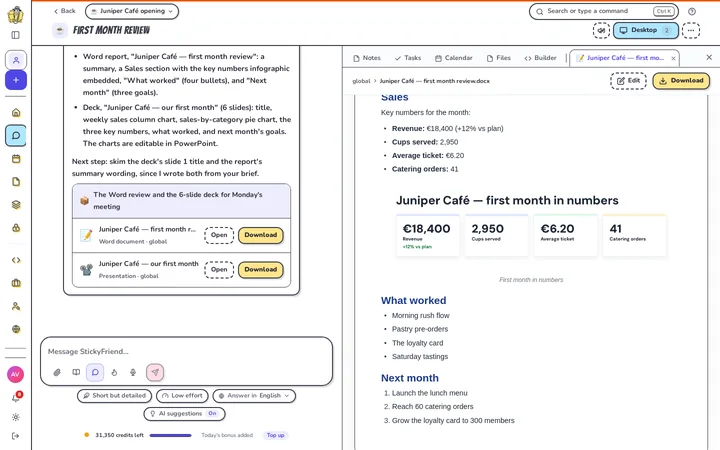
One button opens a desktop beside the chat: your files, the to-dos, the calendar and your notes, with a tab for every document you open. Read the run sheet the AI just wrote, edit it like a Word page, and keep talking.
- Word, Excel and PowerPoint open and edit in place
- To-dos and the calendar change while you chat
- On a phone, one switch flips between the chat and the desktop
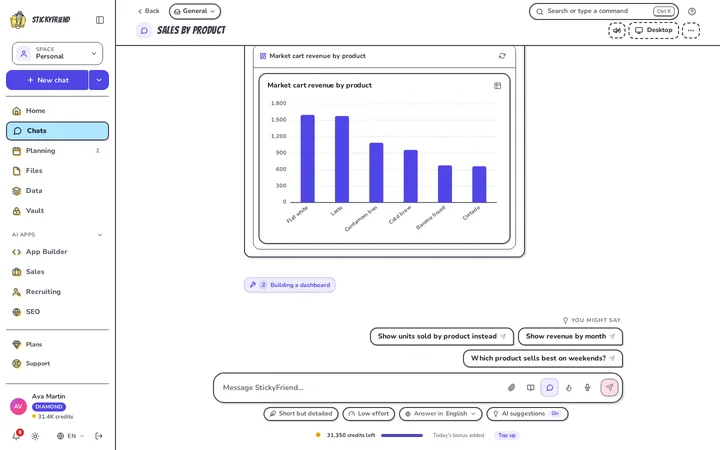
Ask a question, get a live chart in the chat
“Show my sales by product as a bar chart.” The AI reads your own tables and draws a live chart, a key figure or a table under its reply — computed now, never a picture of yesterday. Like it? Keep it as a dashboard.
- Charts, figures and tables from your collections and your CRM
- Open the same blocks from a dashboard you already have
- The numbers update every time you open the chat
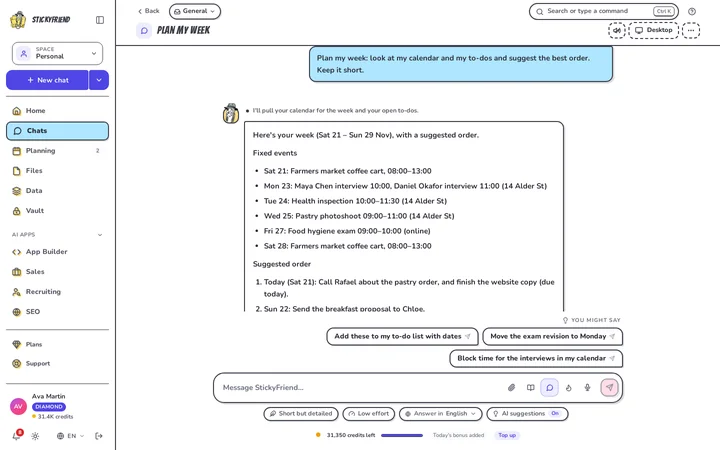
Plan your week in one message
“Plan my week.” The AI looks at every appointment and every open to-do across your subjects, proposes the best order and points out what clashes. Say yes and it moves things for you.
- Reminders set the way you ask: “one hour before”
- Suggestions to pick from, so a click replaces typing
- Each step it takes is listed above its answer
Your AI, your way of working
Small settings that change how every answer feels.
Effort and answer style
Low effort for quick questions, more for hard ones. Quick & fast, short but detailed, or detailed & long.
Talk to it
Hold the microphone to speak and release to send, or tap to dictate. Replies can be read aloud.
Personas and memory
Keep several AIs with their own name and voice. It remembers what matters about you, and you can see and change what it keeps.
Six languages
English, French, Spanish, German, Japanese or Chinese — for the app and for the answers, chat by chat.
From a request to done, in three steps
You talk; the AI works in your workspace; you review.
Ask
Type or speak a request — attach a file, pick a subject, choose how much effort.
Watch it work
It creates and changes the real things, and lists each step it takes.
Check and decide
Open what it made, change it, or undo it. Anything sent to another app waits for your yes.
It drafts. You decide.
An assistant you can trust with your workspace, because the rules are in the product.
- E-mails, messages and posts to other apps wait for your click — it never sends on its own.
- Deleting your notes, to-dos or events needs your yes first, naming exactly what goes.
- A chat in a subject reads that subject; you choose whether it may read your other chats.
- Disposable chats keep nothing once you close them.
AI chat assistant questions, answered
What makes StickyFriend different from a regular AI chatbot?
It does the work instead of only describing it. Ask for a plan and it creates the calendar event, the to-dos and the document, in the right subject, where you can open and change them.
What can the AI create for me?
Notes, to-dos, calendar events with reminders, roadmap phases, Word, Excel, PowerPoint and PDF documents, dashboards, collections, forms and trackers, CRM deals and tasks, and more.
Does it send e-mails or posts without asking?
No. Anything that sends, posts or deletes in a connected app shows a card under its reply and waits for your click.
Can it use my own data?
Yes. It searches your notes, to-dos, events, documents and past chats, reads the libraries you pick, and draws live charts and tables from your collections and your CRM.
Can I talk to it instead of typing?
Yes. Hold the microphone to speak and release to send, or tap it to dictate into the box. A switch reads every reply aloud.
Which languages does it speak?
The app and the AI work in English, French, Spanish, German, Japanese and Chinese, and each chat can answer in its own language.
What happens when a chat gets very long?
It keeps going. The more a chat holds, the more effort goes into optimizing it, so the conversation can continue — a small meter under the box shows how hard it is working.
Can it search the web?
Yes, for current facts such as news, prices, opening hours and places.
Is my chat private?
Your chats are yours. A chat in a subject reads that subject only, you decide whether it may read your other chats, and a disposable chat is not saved at all.
Is it free?
You can start on the free plan with no card. Paid plans add more credits, connected apps and more; the plans are on the pricing page.
Everything else StickyFriend does
The core features and the AI apps share your subjects, your people, your calendar and your files — one account, one place.
Core features
Planning
To-dos, a board, a calendar and a timeline for every subject — or all at once.
Documents & notes
Word, Excel, PowerPoint and PDF made and edited for you, notes, and knowledge bases.
Data & dashboards
Tables of your records, dashboards, forms and trackers — built by asking.
Connected apps
Gmail, Slack, Notion, GitHub and 55 more — the AI acts there after your yes.
Vault
Passwords, cards and API keys behind your PIN — the AI uses a key, never sees it.
Teams
One shared workspace and one pool of credits, each person in their own lane.
AI Apps
Sales — AI CRM
Find leads and work emails, follow every deal and let the AI draft your follow-ups.
Recruiting
Drop the CVs, get explained match scores, run interviews — and decide yourself.
SEO
Track your Google rankings, audit your site and plan what to write next.
App Builder
Describe a mini app: the AI writes the files and runs it in your browser.
Say what you need. Watch it get done.
Start free and give the AI your first task — it will make the real thing.