The AI dashboard builder for the numbers you already have

Keep your records in simple tables, collect answers with forms, count clicks with trackers — then ask the AI for the dashboard. Change it by asking, share it with a link.
Start on the free plan — no card needed.
- 🗃️ Tables of your records
- 📊 Dashboards by asking
- 🧾 Public forms
- 🔗 Click and visit trackers
From scattered numbers to one clear dashboard
Four simple building blocks, and an AI that knows how to put them together.
Collections
Tables with typed columns — numbers, dates, choices, e-mails. Import CSV, Excel or JSON, or fill them by hand.
Dashboards
Key figures, tables and 17 chart kinds, with filters. Drag and resize the blocks.
Forms
A public link for questions, ratings and file uploads. Every answer becomes a row.
Trackers
Count clicks, e-mail opens and site visits, with campaign tags — never an IP address.
Answers in the chat
Ask a question about your data and get a live chart, figure or table under the reply.
Share and export
Share a dashboard by link, print it, or export it to PowerPoint, Word or Excel.
“Build me a dashboard of my sales”
The AI reads your collections, picks the key figures and the charts that fit, and lays out a dashboard. Ask for a different chart, a filter or another figure, and it changes it — or open the editor and move the blocks yourself.
- Line, bar, pie, funnel, heatmap, gauge and more
- Ready-made templates to start from
- Live figures, or fixed ones for a report
- A chart can use the fields of a linked table: revenue by store city
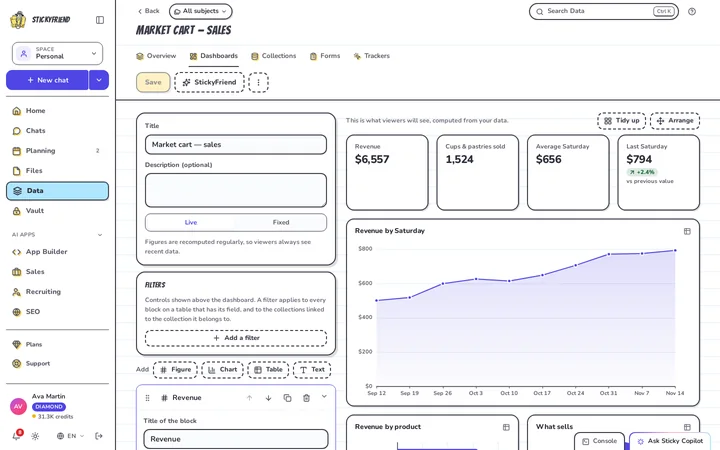
Tables that feel like a spreadsheet
Select blocks of cells, copy them to Excel and paste them back, fill down, undo and redo. Every change — yours or the AI’s — is kept in the table’s history, so a mistake is one click from gone.
- Import CSV, Excel or JSON, export any time
- Google Sheets tabs can come in and stay in sync
- Combine tables into one view: “each order has one customer”
- The AI checks an import first: column names, types, dates and amounts
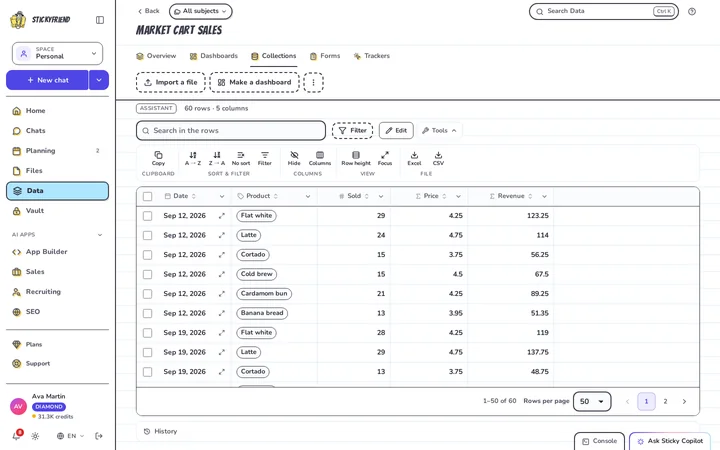
Collect answers and count clicks
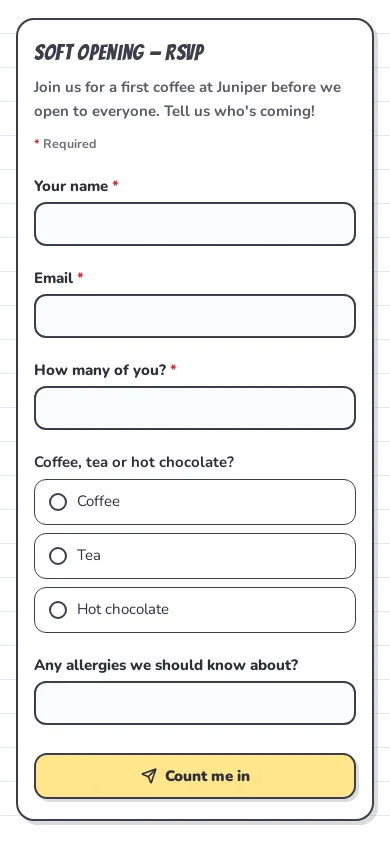
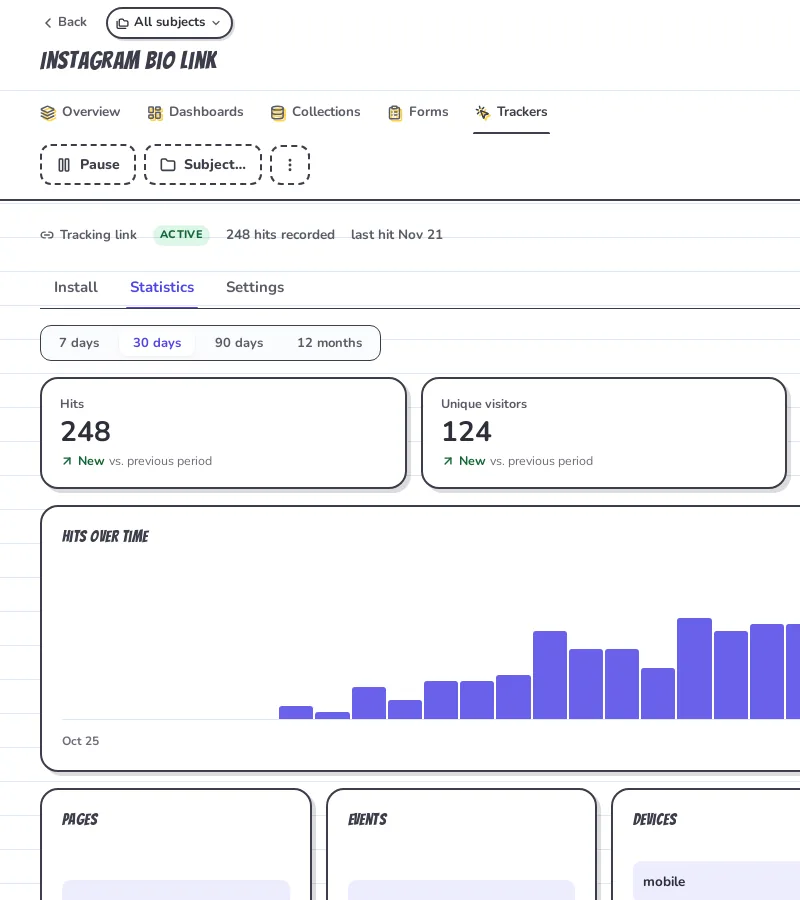
Publish a form with a link — RSVPs, orders, feedback, job applications — and every answer lands in a table you can chart. Put a tracker on a link, an e-mail or a page and see what people click, day by day.
- Closing dates and answer limits
- A CV sent through a form can go straight to Recruiting
- Bots are flagged, not counted
Ask about the page you are looking at
Open the AI from the bottom of any page and it knows where you are: ask about the dashboard in front of you, or let it fill a form, edit cells or open the right table — while you watch.
- It finds fields and buttons by their names
- It never presses a delete confirmation for you
- One thread per part of the app, kept in your browser
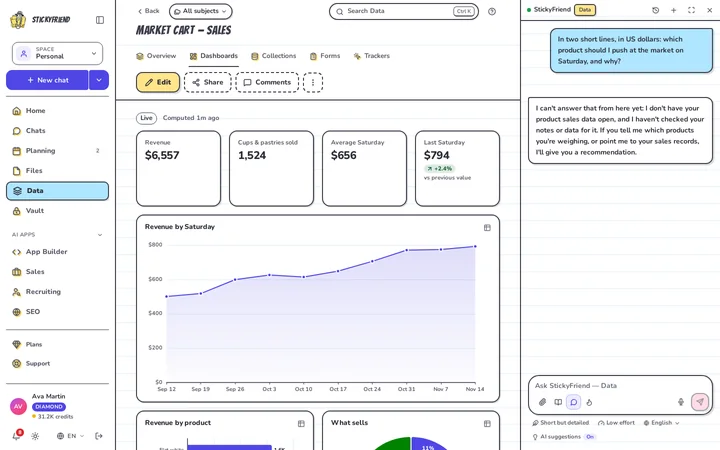
Your first dashboard in three steps
Bring the numbers; the AI does the layout.
Bring your data
Import a file, connect a Google Sheet, or start a form that fills a table.
Ask for a dashboard
Say what you want to see; the AI picks the figures and charts.
Share or export
Send the link, print it, or take it to PowerPoint, Word or Excel.
Dashboards for people who are not analysts
Small businesses, makers and teams who need answers, not a data project.
Shops and cafés
Sales by product and by day, and what sells best on weekends.
Event organisers
RSVPs from a form, counted and charted as they arrive.
Marketers
Link clicks and e-mail opens per campaign, without a heavy analytics tool.
Founders
A budget and a revenue dashboard you can export to a deck for investors.
Your data, counted respectfully
Simple tools with careful defaults.
- Trackers never store an IP address — a daily, salted fingerprint is used instead.
- Every change to a table is in its history, and can be undone.
- A shared dashboard shows only what its blocks show — nothing else of your account.
- The AI asks before it deletes anything you own.
AI dashboard questions, answered
What is an AI dashboard builder?
A tool that builds dashboards from a description. In StickyFriend you ask for the dashboard you want and the AI chooses the key figures and charts from your own tables.
Do I need to know SQL or spreadsheets?
No. You work with tables, forms and dashboards in plain words, and the AI does the rest.
Which charts are there?
Seventeen kinds: line, area, bar, horizontal bar, stacked bar, stacked area, combo, pie, donut, scatter, bubble, heatmap, funnel, radar, gauge, treemap and histogram, plus key figures and tables.
Can I import my spreadsheets?
Yes. Import CSV, Excel or JSON files, or connect a Google Sheets tab and keep it in sync.
Can I share a dashboard?
Yes. Share a public link, print it, or export it to PowerPoint, Word or Excel.
What can forms collect?
Text, e-mails, phone numbers, links, numbers, choices, yes/no, dates, ratings, scales, consent and attached files. Each answer becomes a row you can chart.
Do trackers respect privacy?
Yes. They never store an IP address, and bots are flagged instead of counted.
Can the AI show charts inside a chat?
Yes. Ask about your numbers and a live chart, figure or table appears under its reply, computed each time you open it.
Can my team talk about a dashboard?
Yes. Everyone who can open a dashboard can comment on it, or on one chart, and mention a teammate, who is told in their notifications. An Activity tab shows who changed what, including the changes the AI made.
Is it free?
You can start on the free plan. Each plan sets how many collections, dashboards, forms and trackers you can keep; the plans are on the pricing page.
Everything else StickyFriend does
The core features and the AI apps share your subjects, your people, your calendar and your files — one account, one place.
Core features
AI chat
Ask in plain words: it makes the notes, to-dos, events and documents for you.
Planning
To-dos, a board, a calendar and a timeline for every subject — or all at once.
Documents & notes
Word, Excel, PowerPoint and PDF made and edited for you, notes, and knowledge bases.
Connected apps
Gmail, Slack, Notion, GitHub and 55 more — the AI acts there after your yes.
Vault
Passwords, cards and API keys behind your PIN — the AI uses a key, never sees it.
Teams
One shared workspace and one pool of credits, each person in their own lane.
AI Apps
Sales — AI CRM
Find leads and work emails, follow every deal and let the AI draft your follow-ups.
Recruiting
Drop the CVs, get explained match scores, run interviews — and decide yourself.
SEO
Track your Google rankings, audit your site and plan what to write next.
App Builder
Describe a mini app: the AI writes the files and runs it in your browser.
Turn your numbers into answers
Start free, bring a spreadsheet and ask the AI for your first dashboard.