The AI CRM that keeps every follow-up on track

Your customers, deals and follow-ups in one place. StickyFriend finds leads and their work emails, tells you who to call next and drafts your emails — you review them and press send.
Start on the free plan — no card needed.
- 🔎 Lead and email finder
- 📊 Pipelines with a forecast
- ✍️ The AI drafts, you send
- 🗓️ Tasks in your calendar
Everything a small team needs in one AI CRM
People, companies, deals and tasks — with an assistant that reads them all and prepares your next step.
Find leads
Describe who you want in your own words. The AI searches public professional profiles and tells you who matches.
Get work emails
One person or fifty at once, each with an honest status: verified, likely or a guess.
Pipelines and forecast
Your own stages, fields and currency, a win chance per stage, and the forecast that comes from it.
Lead score
Everyone scores from 0 to 100, with the reasons shown, so you know who to call first.
Email drafts and follow-ups
The AI writes from the record and plans your follow-ups. Nothing leaves without you.
Clean imports
CSV, Excel, JSON, a Google Sheet or your Google contacts — matched, never duplicated, and undoable.
A CRM that fits the way you work
Not a rigid form to fill: change the reports, track your own kind of data, and send from your own mailbox — by hand or by asking the AI.
Your own reports
Ask for the metric you care about — “average deal size per month” — and it appears under the built-in reports. Change it by hand whenever you like.
Your own fields
Track a renewal date, a plan or where you met, on every person and company — filled by you or by the AI, and shown as columns.
Sent from your mailbox
The AI prepares the email in your Gmail or Outlook. You send it with one click, and it goes into the person’s history by itself.
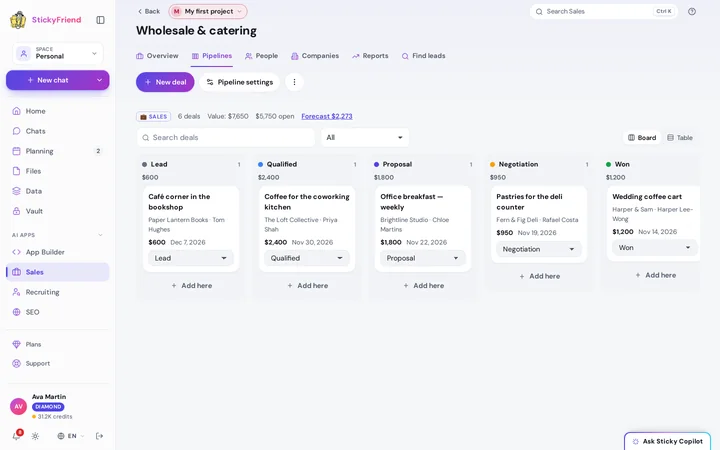
A simple sales pipeline you can read at a glance
Each pipeline has its own stages, fields and currency. Drag a deal to its next stage, or switch to a table to edit many at once. The top of the board shows what is open and what you can expect to win.
- Pipelines for sales, recruiting, SEO outreach or your own process
- A win chance per stage feeds the forecast
- One record per person and company, whatever pipelines they are in
- Deals with no next step, a passed close date or no recent activity are flagged
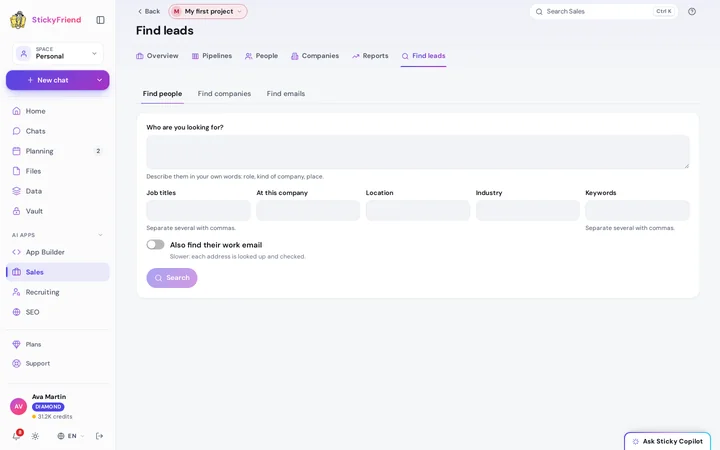
Find leads and their work email without leaving your CRM
Describe who you are looking for the way you would brief a colleague. StickyFriend searches public professional profiles and company pages, judges each result against your request, and can look up and check each work email. Save the good ones to a pipeline in one click.
- Search people or companies by role, company, place, industry and keywords
- Find emails for one person, or for up to 50 at once
- Only “Verified” means the mailbox was confirmed — the app says so
- Everyone you save is matched to the records you already have
- With the Chrome extension, save people from LinkedIn, Sales Navigator and Recruiter — one person seen on all three stays one contact
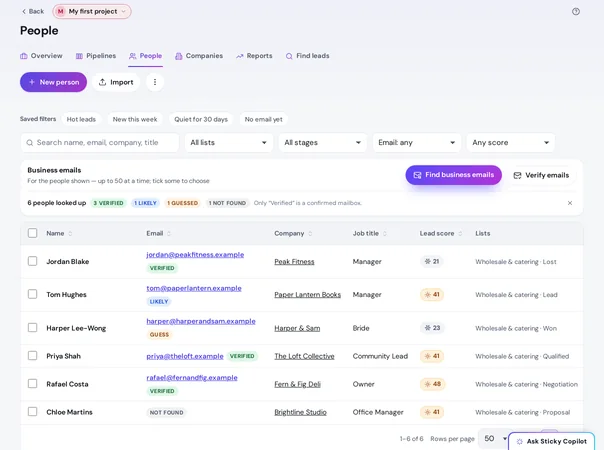
Find and verify business emails for a whole list
Open a list, or your People, and press Find business emails. StickyFriend works out each address from the person’s name and the company’s domain, checks it with the mail server and saves it on the person, with how sure it is. Verify emails checks the addresses you already have and marks the ones that would bounce.
- The people you tick, a whole list, or everyone shown — up to 50 at a time
- Verified, likely, guess, risky or invalid: every address says how sure it is
- An address you typed yourself is never overwritten
- Or just ask the AI: “find the business emails of my Lyon leads”
Save leads from LinkedIn with the extension
Add StickyFriend to Chrome and prospect where your buyers already are. See the browser extension.
Save people in one click
On a LinkedIn profile, a people search, Sales Navigator or Recruiter: save one person, or the whole page, to a pipeline.
One person, one contact
Someone seen on LinkedIn, Sales Navigator and Recruiter stays one contact, matched to the records you already have.
Then their business email
Once they are saved, find and verify their business emails from the list in one click.
Ask about the page you are on
The side chat reads the profile or company page in front of you, then answers, drafts or saves for you.
Connect the tools your sales run on
Connect your accounts once and work from one place — the AI acts there after your yes. See every connector.
Gmail and Outlook
Send your follow-ups from your own mailbox; Gmail conversations show up on each person’s record.
HubSpot and Salesforce
Look up and update contacts, deals, leads and opportunities in the CRM you already use, from a chat.
Google Calendar and Calendly
Your meetings in your planner, free time found for you, your booking link shared in a follow-up.
LinkedIn
Write a post with the AI and publish it on your profile or company page when you say yes.
Mailchimp
Manage your audiences and build the email campaign for your next launch.
Google Sheets
Bring a lead list in from a sheet: the AI suggests which column is which, and every row is checked.
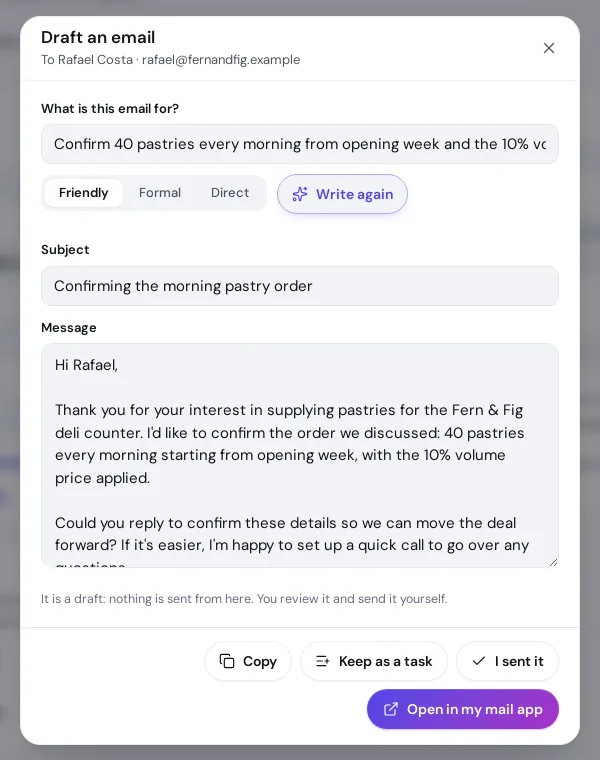
AI follow-up emails you review before they go
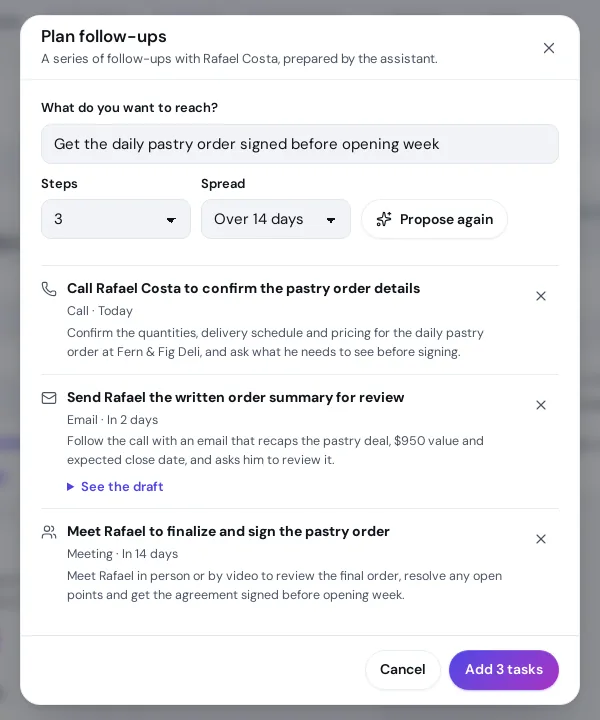
Open a person or a deal and say what you need: confirm an order, book a demo next week. The assistant reads the record and its history and writes the email in the tone you pick — or plans a short series of follow-ups as tasks. Every email stays a draft until you send it yourself.
- Friendly, formal or direct, rewritten in one click
- Follow-up plans of 2 to 5 steps over 7, 14 or 30 days
- Remove any step before you accept the plan
- An AI brief on any record: where things stand and what to do next
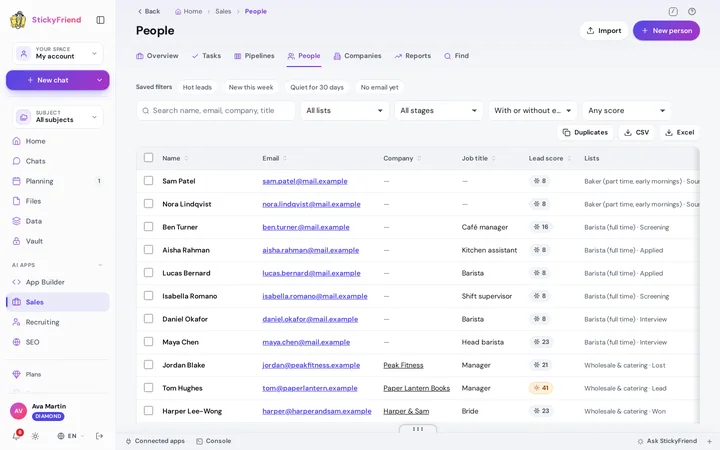
Lead scoring that explains itself
Every person gets a score from 0 to 100, with the reasons beside it: a verified email, a decision-maker title, an open deal, a conversation in the last 30 days. The overview lists who to talk to first, and saved filters find hot leads, people gone quiet for 30 days or anyone still missing an email.
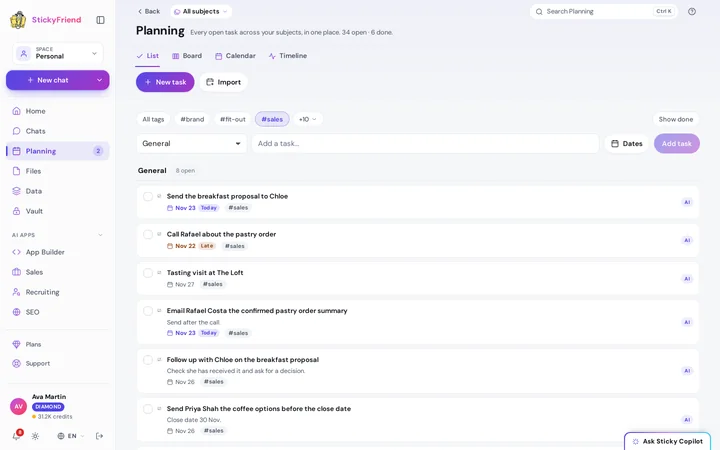
Sales tasks that land in your calendar
Calls, emails, meetings and follow-ups sit on the person, company or deal they are about. Each one is also a to-do in StickyFriend’s Planning — list, board and calendar — so ticking it in one place ticks it everywhere.
From first contact to won, in four steps
No set-up project: bring your people in and the AI starts helping on day one.
Bring your people in
Import a file, a Google Sheet or your Google contacts — or let the AI find leads.
Shape your pipeline
Pick sales, recruiting, SEO outreach or custom, then rename the stages.
Let the AI prepare
Ask for a brief, an email draft or a follow-up plan, on the page or in any chat.
Decide and send
Edit, send from your own mail app, and log it on the timeline in one click.
A CRM for small businesses, freelancers and lean teams
If you sell, follow up and keep your own books of contacts, it fits.
Freelancers and consultants
Every client, quote and conversation in one place, with a reminder before a lead goes cold.
Small agencies
A pipeline per service, a forecast for the month and a brief before each client call.
Local businesses
Wholesale, catering and partnership deals — like the café in these screenshots.
Founders who sell
Find the right people and their work email, and plan follow-ups without a sales team.
The AI prepares. You decide.
StickyFriend is there to make you faster, not to act behind your back.
- Nothing is sent for you: every email is a draft you send yourself.
- An import is one step you can undo, and deleted people can be restored for a few days.
- Erase a person and their whole history when they ask you to (GDPR).
- Export a record, or your people, companies and pipelines as CSV or Excel.
Connected to everything else you do
Sales is one app inside StickyFriend, so your deals meet your calendar, your data and your mail.
Planning
Sales tasks show up in your to-do list, on your board and in your calendar.
StickyCopilot
Ask “What should I do first in Sales today?” from the Ask Sticky Copilot tab in the corner of the page.
Gmail and Google contacts
On paid plans, see your emails with each person on their record and import your contacts.
Zapier and Make
Webhooks send your CRM changes to other tools and create contacts from them.
AI CRM questions, answered
What is an AI CRM?
A CRM keeps your contacts, companies and deals in one place. An AI CRM adds an assistant that does the groundwork: StickyFriend finds leads and their work emails, scores who to call first, writes briefs and drafts your follow-up emails. You decide what gets sent.
Can I start for free?
Yes. You can start on the free plan without a card. Some features rely on connected apps, such as Gmail, which are part of the paid plans — the plans are on the pricing page.
How does the lead finder work?
You describe the people or companies you want in your own words. StickyFriend searches public professional profiles and company pages, then marks each result as a match, not a match or unsure. It can also look up each person’s work email.
How accurate is the email finder?
Every address has a status. Only “Verified” means the mailbox was confirmed. “Likely” and “Guess” follow the company’s usual address pattern and may bounce, and the app tells you so.
Does the AI send emails for me?
No. In Sales, every email the AI writes is a draft: you copy it, open it in your own mail app or keep it as a task. A follow-up plan becomes tasks with drafts attached — nothing goes out on its own.
Can I import my contacts from a spreadsheet?
Yes: a CSV, TSV, Excel or JSON file, a Google Sheets link, or your Google contacts through a connected Gmail. The AI suggests which column is which, every row is checked before anything is saved, existing records are matched instead of duplicated, and the whole import can be undone.
How is the sales forecast calculated?
Each open deal’s value is multiplied by its stage’s win chance, which you set per stage. Reports add the win rate, the funnel, value by stage, the average deal and the sales cycle.
Can I track more than sales deals?
Yes. A pipeline can be for sales, recruiting, SEO outreach (backlinks and guest posts) or your own process, each with its own stages and fields. People and companies are shared by all of them.
Can I delete a contact for good?
Yes. Deleting can be undone for a few days; erasing removes the person, their place on every pipeline and their whole history, for good. Your CRM belongs to your account only.
Can I use it on my phone?
Yes. StickyFriend runs in any modern browser and installs as an app on your phone or computer, so your pipeline goes where you go.
Can I save people from LinkedIn?
Yes, with the StickyFriend extension for Chrome: it reads LinkedIn people searches, Sales Navigator and Recruiter lists and profiles, saves them to a list or a collection and finds their emails. The same person seen on all three stays one contact.
Everything else StickyFriend does
The core features and the AI apps share your subjects, your people, your calendar and your files — one account, one place.
Core features
AI chat
Ask in plain words: it makes the notes, to-dos, events and documents for you.
Planning
To-dos, a board, a calendar and a timeline for every subject — or all at once.
Documents & notes
Word, Excel, PowerPoint and PDF made and edited for you, notes, and knowledge bases.
Data & dashboards
Tables of your records, dashboards, forms and trackers — built by asking.
Connected apps
Gmail, Slack, Notion, GitHub and 55 more — the AI acts there after your yes.
Vault
Passwords, cards and API keys behind your PIN — the AI uses a key, never sees it.
Teams
One shared workspace and one pool of credits, each person in their own lane.
AI Apps
Recruiting
Drop the CVs, get explained match scores, run interviews — and decide yourself.
SEO
Track your Google rankings, audit your site and plan what to write next.
App Builder
Describe a mini app: the AI writes the files and runs it in your browser.
Never lose a follow-up again
Start free, bring your contacts in and let the AI prepare your next step.